What it does
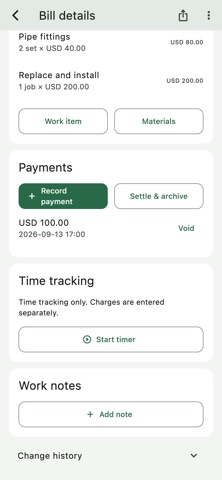
Trade Ledger is a job record for independent tradespeople and small service businesses. Work items, materials, discounts and payments sit with the same bill. Time notes stay separate from charges, so running a timer does not silently add an amount to the customer’s bill.
Who it is for
People managing straightforward service jobs who want to keep an understandable bill and supporting work notes without using a full project-management system.
Features & workflow
Build the bill as work progresses
Add work items, materials and discounts. Keep received payments distinct from the outstanding balance.
Record time separately
Start and stop a timer or add a work note. Recorded time does not automatically become a charge.
Add evidence when useful
Photos can accompany charges, work notes or payment records, but are optional for simpler jobs.
Share and archive
Send a read-only customer link. Archive a fully settled bill to prevent further edits.
Getting started
Create the job bill
Choose the currency for the new bill and add recognizable work items.
Update the record
Add materials, notes and any explicitly chosen charges as the work progresses.
Record received payments
Log each payment separately, then archive the bill when it is fully settled.
Plans & purchases
Free access has monthly usage limits. Pro adds higher monthly bill limits and CSV export. Monthly and yearly plans display their localized price before purchase.
Before you start
An account and internet connection are required. Bill dates use UTC+8, and customer web pages are currently in Chinese. Amounts use two decimal places; currency conversion, tax invoicing and payment collection are not provided. The September 17 public lookup returned the app in US and UK storefronts, but not Germany or France.
Common questions
Does the timer charge the customer automatically?
No. Time records and bill charges are separate.
Can I choose a currency?
The published listing supports USD, EUR, GBP, CNY, HKD, SGD, AUD, CAD, NZD and CHF for new bills, without conversion.
Can English-speaking customers use the shared pages?
The current listing says customer web pages are in Chinese. Check whether that fits your customer before using this workflow.